World's simplest browser-based utility for creating text marquees. Enter one or more lines to create a moving text strip, choose a motion style from classic scrolling to zoom or fade transitions, and you'll instantly get an animated marquee. Customize typography, add decorative separators between phrases, and apply effects such as blink, wave, glitch, or bounce. Powerful, free, and fast. Created by developers from team Browserling.
World's simplest browser-based utility for creating text marquees. Enter one or more lines to create a moving text strip, choose a motion style from classic scrolling to zoom or fade transitions, and you'll instantly get an animated marquee. Customize typography, add decorative separators between phrases, and apply effects such as blink, wave, glitch, or bounce. Powerful, free, and fast. Created by developers from team Browserling.

With this online tool, you can create a moving text marquee from one or more short text lines. A marquee is ideal for displaying text as a dynamic, scrolling message rather than a static paragraph. The text can move smoothly across the viewing area in any direction. A horizontal or vertical marquee is convenient for airport-style notices, classroom reminders, sports score labels, stream overlays, or cafe menus. Start by entering the text that should appear in the marquee. A single line creates a repeating one-message marquee, and several lines create a rotating sequence of separate phrases. Then choose the marquee text's typography. You can set the color, size, line height, letter spacing, font family, and font weight. The font can come from the built-in list or from an external font URL when the custom font mode is selected. The marquee can also include a separator between phrases. This separator may be a predefined symbol, such as a star, diamond, arrow, or flower, or a custom character typed by you. The separator has its own color and can be shifted vertically to align with the text baseline. The motion settings define how the marquee is read. Continuous scrolling produces a traditional marquee strip. Discrete scrolling moves the text in discrete steps. Slide, fade, wipe, zoom, and pixelation modes turn the lines into changing text panels. The direction setting chooses whether the marquee is horizontal or vertical. Right-to-left and left-to-right create horizontal marquees, while bottom-to-top and top-to-bottom create vertical marquees. Additional effects, such as blinking, pulsing, or jittering, adjust the marquee's visual style, making it appear softer, more dynamic, or more attention-grabbing. You can also control the marquee space and timing. The width and height options define the area through which the text moves; if they are empty, the tool calculates a suitable size automatically. The background option sets the surface behind the text and can also be transparent. The speed value controls how fast the text crosses the marquee area. Higher values, such as 8 or 10, create a fast-moving marquee; lower values, such as 2, 1, or 0.5, make a slower marquee that is easier to read but generates more frames. The tool also reports useful technical details, including the number of frames, total duration, frame delay, playback FPS, and final dimensions. Textabulous!
With this online tool, you can create a moving text marquee from one or more short text lines. A marquee is ideal for displaying text as a dynamic, scrolling message rather than a static paragraph. The text can move smoothly across the viewing area in any direction. A horizontal or vertical marquee is convenient for airport-style notices, classroom reminders, sports score labels, stream overlays, or cafe menus. Start by entering the text that should appear in the marquee. A single line creates a repeating one-message marquee, and several lines create a rotating sequence of separate phrases. Then choose the marquee text's typography. You can set the color, size, line height, letter spacing, font family, and font weight. The font can come from the built-in list or from an external font URL when the custom font mode is selected. The marquee can also include a separator between phrases. This separator may be a predefined symbol, such as a star, diamond, arrow, or flower, or a custom character typed by you. The separator has its own color and can be shifted vertically to align with the text baseline. The motion settings define how the marquee is read. Continuous scrolling produces a traditional marquee strip. Discrete scrolling moves the text in discrete steps. Slide, fade, wipe, zoom, and pixelation modes turn the lines into changing text panels. The direction setting chooses whether the marquee is horizontal or vertical. Right-to-left and left-to-right create horizontal marquees, while bottom-to-top and top-to-bottom create vertical marquees. Additional effects, such as blinking, pulsing, or jittering, adjust the marquee's visual style, making it appear softer, more dynamic, or more attention-grabbing. You can also control the marquee space and timing. The width and height options define the area through which the text moves; if they are empty, the tool calculates a suitable size automatically. The background option sets the surface behind the text and can also be transparent. The speed value controls how fast the text crosses the marquee area. Higher values, such as 8 or 10, create a fast-moving marquee; lower values, such as 2, 1, or 0.5, make a slower marquee that is easier to read but generates more frames. The tool also reports useful technical details, including the number of frames, total duration, frame delay, playback FPS, and final dimensions. Textabulous!
In this example, we create a calm airport boarding marquee for a gate screen. It displays the two-line message "Flight Boarding Now" and "Gate A12" in bold white letters on a deep blue background. The text scrolls horizontally from right to left, and a custom airplane separator makes the marquee feel like a real travel notice.

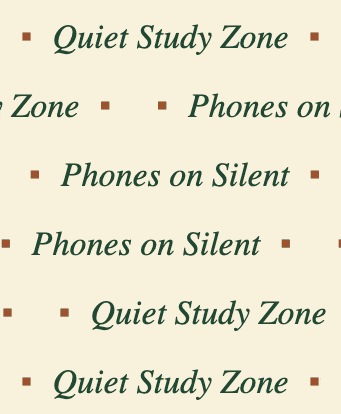
In this example, we create a slow marquee text for a library reading room. It moves the text from right to left in a slide mode to remind visitors about study-room etiquette. We leave the marquee size options empty, allowing the program to automatically determine the width and height. We use italic serif text, decorate the phrases with small square symbols, and apply a calm color scheme with dark green text on a paper-like background without additional motion effects.
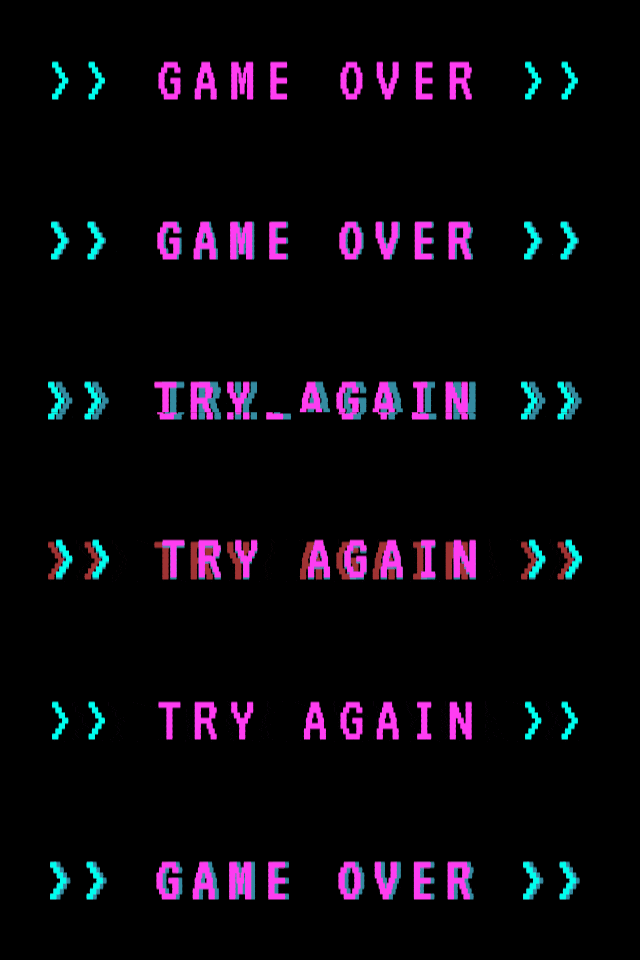
In this example, we create a retro arcade-style marquee with a neon glow effect. It displays the phrases using a pixel-style custom font and bright pink text on a black background. The text scrolls vertically with a wipe transition, while a glitch effect adds a digital distortion that mimics an old arcade screen. We also add cyan arrow separators to enhance the game-like feel and increase speed, creating a fast, energetic motion.
You can pass options to this tool using their codes as query arguments and it will automatically compute output. To get the code of an option, just hover over its icon. Here's how to type it in your browser's address bar. Click to try!
Find Levenstein distance of two text fragments.
Create a list of all words in text.
Lemmatize all words in text.
Apply stemming to all words in text.
Add color to punctuation symbols in text.
Add color to letters in text.
Add color to words in text.
Add color to sentences in text.
Add color to paragraphs in text.
Add slight perturbations to the given text.
Generate text using random words.
Generate lorem ipsum placeholder text.
Generate a crossword puzzle from the given words.
Convert English text to Braille writing system.
Convert Braille symbols to English text.
Convert text characters to their corresponding code points.
Convert numeric character code points to text.
Convert CSV data to plain text columns.
Convert plain text columns to a CSV file.
Create a list of all 3-grams.
Encode the entire text to a single number.
Decode text that was encoded as a number back to text.
Divide text into chunks of certain size.
Apply formatting and modification functions to text.
Count the number of punctuation marks and other sybmols in text.
Count the number of letters in text.
Count the number of sentences in text.
Count the number of paragraphs in text.
Apply text transformation rules to any text.
Analyze text for interesting patterns.
Add accent marks to text letters.
Add a counter before every letter in text.
Add a counter before every word in text.
Add a counter before every sentence in text.
Add a counter before every paragraph in text.
Interleave the letters or words of the given text fragments.
Mess up the spacing between letters in any text.
Extract all emails from text.
Extract all URLs from text.
Extract all numbers from text.
Extract all countries from text.
Extract all cities from text.
Convert text to punycode.
Convert punycode to text.
Encode text to Baudot encoding.
Decode Baudot-encoded text.
Encode text to base32 encoding.
Decode base32-encoded text.
Encode text to base45 encoding.
Decode base45-encoded text.
Encode text to base58 encoding.
Decode base58-encoded text.
Encode text to Ascii85 encoding.
Decode Ascii85-encoded text.
Encode text to base65536 encoding.
Decode base65536-encoded text.
Encode text to nettext encoding.
Decode nettext-encoded text.
Convert written text into natural sounding voice.
Convert a voice recording to text.
Encode text to UTF8 encoding.
Decode UTF8-encoded text.
Encode text to UTF16 encoding.
Decode UTF8-encoded text.
Encode text to UTF32 encoding.
Decode UTF32-encoded text.
Encode text to IDN.
Decode IDN-encoded text.
Convert text to Unix-to-Unix encoding.
Decode Unix-to-Unix-encoded text.
Convert text to Xxencoding.
Decode Xxencoded text.
Encode text to QP encoding.
Decode QP-encoded text.
Remove all HTML tags from Text.
Remove all XML tags from Text.
Remove new line symbols from the end of each text line.
Find the difference between two text fragments.
Generate various text typos.
Generate a mirror reflection of text.
Cut out a piece of text.
Grep text for regular expression matches.
Extract first symbols, words, or lines from text.
Extract last symbols, words, or lines from text
Return the first letter of each word in text.
Make every paragraph to be two paragraphs in the given text.
Create an image from all words in text.
Create a circle from all letters in text.
Create a spiral from all letters in text.
Create a circle from all words in text.
Create a matrix of any dimensions from letters in text.
Create a matrix of any dimensions from words in text.
Create a spiral from all words in text.
Split the input text into syllables.
Write any text on an LCD display (with LCD font).
Convert text to 2-dimensional drawing.
Convert text to 3-dimensional drawing.
Create a GIF animation of a text message.
Create a GIF animation that slowly reveals a text message.
Decode text using the wrong encoding and create garbled text.
Try to find original text from garbled mojibaked text.
Make text harder to read.
Generate the entire alphabet from a to z.
Print the alphabet in random order.
Delete swear words from text.
Edit text in a neat browser-based editor.
Subscribe to our updates. We'll let you know when we release new tools and features, and when we organize online workshops.
Enter your email here
We're Browserling — a friendly and fun cross-browser testing company powered by alien technology. At Browserling we love to make people's lives easier, so we created this collection of online text tools. Our tools are focused on getting things done and as soon as you load your text in the input of any of our tools, you'll instantly get the result. Behind the scenes, our online text tools are actually powered by our web developer tools that we created over the last couple of years. Check them out!