Our Network


Coming Soon


Coming Later

Scrolling Text Generator

World's Simplest Text Tool

World's simplest browser-based utility for generating scrolling text. Enter one or more phrases, style the letters, pick a motion mode and animation effect, and you'll instantly get a moving text strip in the output area. Powerful, free, and fast. Type your text and create horizontal or vertical scrolling banners. Created by developers from team Browserling.

Scrolling Text Generator

World's Simplest Text Tool

World's simplest browser-based utility for generating scrolling text. Enter one or more phrases, style the letters, pick a motion mode and animation effect, and you'll instantly get a moving text strip in the output area. Powerful, free, and fast. Type your text and create horizontal or vertical scrolling banners. Created by developers from team Browserling.

Tool Options

Text Configuration

Text message (one phrase per line).
Choose a color for the text.
Text size.
Line height.
Spacing between characters.
Choose the text typeface.
Load an external font via link.
Set the font thickness.

Separator Character

Select a glyph to separate moving phrases.
Paste a custom icon or glyph.
Choose a color for the glyph.
Set the character's vertical offset.

Motion and Effects

Select the transition style.
Select the flow direction. (Applies only to scrolling, sliding, and wiping.)
Add an extra visual effect.

Output Controls

Canvas width (auto-calc if empty).
Canvas height (auto-calc if empty).
Set how fast the text scrolls. (For example, 7, 4, 2, 1, or 0.5.)
Choose the canvas background.
{frames}

What Is a Scrolling Text Generator?

With this online tool, you can turn ordinary text into a moving text strip. Instead of a static caption, the program arranges one or more lines into a smooth stream of messages that can move across the screen horizontally, vertically, or switch between short notices. This makes the tool useful for announcement bars, event ribbons, station-style boards, shop signs, side panels, and overlays. Each line that you enter becomes a separate phrase, so you can create a repeating text strip from a single slogan or from several different messages. The first group of options controls the appearance of the letters. You can change the text color and size, line spacing, character spacing, font, and weight. If the standard fonts don't match the style you need, then you can import another typeface from a URL. To activate it, select the custom font mode. For better readability and a more decorative look, you can insert a separator between phrases and style it independently. The separator can be chosen from the built-in list or entered manually. To activate a custom separator, select the custom symbol mode. You can also change the separator's color independently and adjust its position using the vertical offset option. Positive values move the symbol up, and negative values move it down. The next group of options defines how the message moves. You can make it scroll continuously, move step by step, slide between phrases, or switch messages using transitions such as fading, wiping, zooming, or pixelation. The text can move from left to right, right to left, top to bottom, or bottom to top, forming either a horizontal news ticker or a vertical announcement column. Additional effects make the movement more expressive. The text can blink, pulse, bounce, wave, jitter, or briefly glitch, giving the marquee a lively, urgent, or playful character. The final options control the space in which the text moves. You can set the width and height of the output area manually, or leave these fields empty and let the program determine the size automatically. You can also choose any background, including a transparent one. The speed option determines how quickly the text passes through the visible area and accepts both whole and fractional values. Larger numbers produce faster motion, and smaller numbers produce slower motion. The tool also displays useful information, including the total number of frames, animation duration, frame delay, frame rate, and final dimensions. Textabulous!

What Is a Scrolling Text Generator?

With this online tool, you can turn ordinary text into a moving text strip. Instead of a static caption, the program arranges one or more lines into a smooth stream of messages that can move across the screen horizontally, vertically, or switch between short notices. This makes the tool useful for announcement bars, event ribbons, station-style boards, shop signs, side panels, and overlays. Each line that you enter becomes a separate phrase, so you can create a repeating text strip from a single slogan or from several different messages. The first group of options controls the appearance of the letters. You can change the text color and size, line spacing, character spacing, font, and weight. If the standard fonts don't match the style you need, then you can import another typeface from a URL. To activate it, select the custom font mode. For better readability and a more decorative look, you can insert a separator between phrases and style it independently. The separator can be chosen from the built-in list or entered manually. To activate a custom separator, select the custom symbol mode. You can also change the separator's color independently and adjust its position using the vertical offset option. Positive values move the symbol up, and negative values move it down. The next group of options defines how the message moves. You can make it scroll continuously, move step by step, slide between phrases, or switch messages using transitions such as fading, wiping, zooming, or pixelation. The text can move from left to right, right to left, top to bottom, or bottom to top, forming either a horizontal news ticker or a vertical announcement column. Additional effects make the movement more expressive. The text can blink, pulse, bounce, wave, jitter, or briefly glitch, giving the marquee a lively, urgent, or playful character. The final options control the space in which the text moves. You can set the width and height of the output area manually, or leave these fields empty and let the program determine the size automatically. You can also choose any background, including a transparent one. The speed option determines how quickly the text passes through the visible area and accepts both whole and fractional values. Larger numbers produce faster motion, and smaller numbers produce slower motion. The tool also displays useful information, including the total number of frames, animation duration, frame delay, frame rate, and final dimensions. Textabulous!


Scrolling Text Generator Examples

Click to try!
click me

Subway Platform Arrival Strip

In this example, we generate a transit-style ticker that shows platform arrival updates. We use bold Arial Narrow text and add small right-pointing triangle separators between phrases. The background is a deep blue that matches typical station displays. The phrases scroll continuously from right to left, and a blinking effect adds motion and draws attention.

Required options
These options will be used automatically if you select this example.
This example will reset all options to their
default values before applying new ones.
Text message (one phrase per line).
Choose a color for the text.
Text size.
Line height.
Spacing between characters.
Choose the text typeface.
Load an external font via link.
Set the font thickness.
Select a glyph to separate moving phrases.
Paste a custom icon or glyph.
Choose a color for the glyph.
Set the character's vertical offset.
Select the transition style.
Select the flow direction. (Applies only to scrolling, sliding, and wiping.)
Add an extra visual effect.
Canvas width (auto-calc if empty).
Canvas height (auto-calc if empty).
Set how fast the text scrolls. (For example, 7, 4, 2, 1, or 0.5.)
Choose the canvas background.
click me

Vertical Market Chalkboard

This example creates a shop-style display where product names move upward like items on a handwritten specials board. We use bold red Tahoma text with orange decorative check marks. The animation uses slide motion from bottom to top with a gradient shift effect, moving slowly at a speed of 0.8.

Required options
These options will be used automatically if you select this example.
This example will reset all options to their
default values before applying new ones.
Text message (one phrase per line).
Choose a color for the text.
Text size.
Line height.
Spacing between characters.
Choose the text typeface.
Load an external font via link.
Set the font thickness.
Select a glyph to separate moving phrases.
Paste a custom icon or glyph.
Choose a color for the glyph.
Set the character's vertical offset.
Select the transition style.
Select the flow direction. (Applies only to scrolling, sliding, and wiping.)
Add an extra visual effect.
Canvas width (auto-calc if empty).
Canvas height (auto-calc if empty).
Set how fast the text scrolls. (For example, 7, 4, 2, 1, or 0.5.)
Choose the canvas background.
click me

Cyberpunk Stream Bootloader

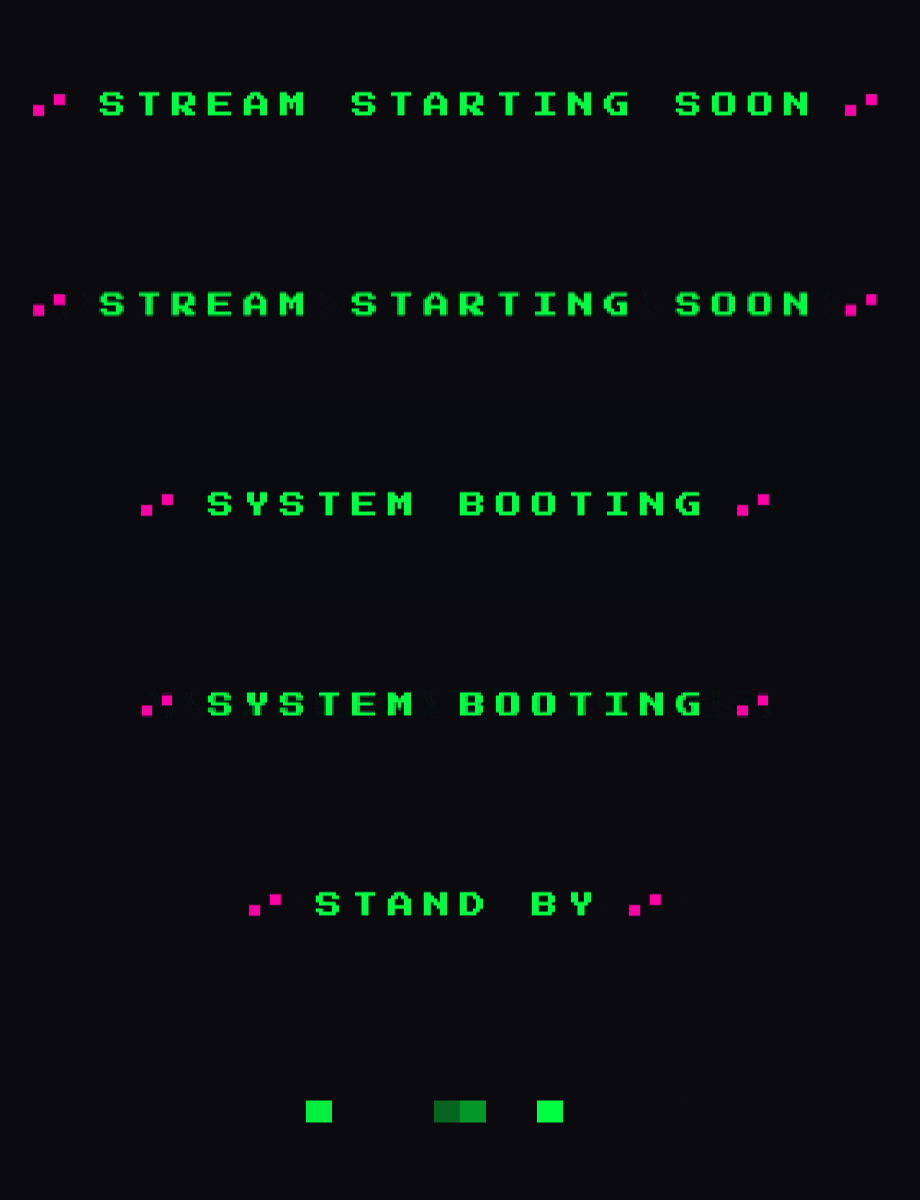
In this example, we design a cyberpunk-style Twitch starting screen with animated status text. We use a pixel-style custom font (Press Start 2P) in neon green (#00ff41) and add magenta glitch symbols (▗▘) as decorative separators with a slight vertical offset. The text changes with a pixelation motion mode, while a brightness-pulse effect simulates a flickering digital signal.
Required options
These options will be used automatically if you select this example.
This example will reset all options to their
default values before applying new ones.
Text message (one phrase per line).
Choose a color for the text.
Text size.
Line height.
Spacing between characters.
Choose the text typeface.
Load an external font via link.
Set the font thickness.
Select a glyph to separate moving phrases.
Paste a custom icon or glyph.
Choose a color for the glyph.
Set the character's vertical offset.
Select the transition style.
Select the flow direction. (Applies only to scrolling, sliding, and wiping.)
Add an extra visual effect.
Canvas width (auto-calc if empty).
Canvas height (auto-calc if empty).
Set how fast the text scrolls. (For example, 7, 4, 2, 1, or 0.5.)
Choose the canvas background.

Pro tips Master online text tools

You can pass options to this tool using their codes as query arguments and it will automatically compute output. To get the code of an option, just hover over its icon. Here's how to type it in your browser's address bar. Click to try!

https://onlinetexttools.com/generate-scrolling-text?text=Blue%20Line%20Arriving%250AStand%20Behind%20Line%250ADoors%20Open%20Left&text-size=28&line-height=&text-spacing=7&text-color=%2523ffd166&typeface=Arial%20Narrow&url=&text-weight=bold&decorative-symbol=custom&custom-decorative-symbol=%20%20%25E2%2596%25B8%20%20&decorative-symbol-color=%2523ffd166&decorative-symbol-offset=0&motion-mode=continuous-scroll&direction=right-to-left&effect=double-blink&width=680&height=90&speed=5&background=%25230b1f5c

All Text Tools

Didn't find the tool you were looking for? Let us know what tool we are missing and we'll build it!
Quickly split text into chunks.
Quickly merge lines of text together via a delimiter.
Quickly repeat text many times.
Quickly write text backwards.
Quickly cut text to the given length.
Quickly extract a slice from text.
Quickly trim left or right side of text.
Quickly pad the left side of text.
Quickly pad the right side of text.
Quickly align text to the left side.
Quickly align text to the right side.
Quickly center text.
Quickly add indentation to each text line.
Quickly delete indentation from each text line.
Quickly stretch spaces between words to make all text lines equal length.
Quickly wrap words in text to a specified length.
Quickly reverse every word in the given text.
Quickly reverse every sentence in the given text.
Quickly reverse every paragraph in the given text.
Quickly swap pairs of adjacent letters in words.
Quickly swap pairs of adjacent words in text.
Quickly make every word to be two words in the given text.
Quickly delete certain words from the given text.
Quickly make every sentence to be two sentences in the text.
Quickly delete certain sentences from the given text.
Quickly substitute certain words in text with other words.
Quickly insert random words in random positions in text.
Quickly insert random letters in words in text.
Quickly randomly change letters in text and make mistakes.
Quickly create fake text using similar-looking characters.
Quickly convert fake text containing fake characters to regular text.
Quickly check if the given text is forged (contains homoglyphs).
Quickly delete random letters from words in text.
Quickly delete random symbols from text.
Quickly add patterns before and after each word in text.
Quickly remove patterns appearing before and after each word in text.
Quickly prepend a prefix to one or more text lines.
Quickly append a suffix to one or more text lines.
Quickly remove a prefix from one or more text lines.
Quickly remove a suffix from one or more text lines.
Quickly prepend a prefix to all words in text.
Quickly append a suffix to all words in text.
Quickly remove any prefix from all words in text.
Quickly remove any suffix from the end of all words in text.
Quickly insert characters between all letters of all words in text.
Quickly surround each letter of the text with decorative symbols.
Quickly delete all blank lines from text.
Quickly delete all repeated lines from text.
Quickly return text lines that match a pattern or a regex.
Quickly return words in text that match a pattern or a regex.
Quickly return all sentences that match a pattern or a regex.
Quickly return all paragraphs that match a pattern or a regex.
Quickly sort lines alphabetically, numerically, or by their length.
Quickly sort sentences alphabetically, numerically, or by their length.
Quickly sort paragraphs alphabetically, numerically, or by their length.
Quickly sort words alphabetically, numerically, or by their length.
Quickly sort all letters in all words in any text.
Quickly sort all symbols in text alphabetically.
Quickly randomize the order of letters in text.
Quickly make text barely readable.
Quickly randomize the order of words in text.
Quickly randomize the order of lines in text.
Quickly randomize the order of sentences in text.
Quickly randomize the order of paragraphs in text.
Quickly calculate the sum of letters as if they were numbers.
Quickly remove line breaks and get a continuous text.
Quickly extract a text snippet of the given length.
Quickly find and replace text patterns.
Quickly count the number of characters in text.
Quickly find the most popular letters in the given text.
Quickly find the most popular words in the given text.
Quickly calculate the Shannon entropy of any text.
Quickly find the number of words in text.
Quickly analyze text and print its statistical information.
Quickly find and print all unique words in text.
Quickly find and print all repeated words in text.
Quickly find and print all unique letters in text.
Quickly find and print all repeated letters in text.
Quickly delete all repeated words in text.
Quickly find the number of lines in text.
Quickly add a number before every text line.
Quickly remove line numbering in text.
Quickly create an image from text.
Quickly create a horizontally or vertically scrolling text.
Quickly write the given text in a different font.
Quickly remove all fancy fonts and styling from text.
Quickly use superscript characters to write text.
Quickly use subscript characters to write text.
Quickly use tiny characters to write text.
Quickly use bold characters to write text.
Quickly use italic characters to write text.
Quickly use cursive script to write text characters.
Quickly add an underline below all letters and words in text.
Quickly add a strikethrough to all letters and words in text.
Quickly apply the Zalgo effect to the input text.
Quickly remove the Zalgo effect from the input text.
Quickly construct a palindrome from plain text.
Quickly test if text is a palindrome.
Quickly switch between various letter cases in text.
Quickly convert text letters to uppercase.
Quickly convert text letters to lowercase.
Quickly convert all words in text to title case.
Quickly capitalize the first letter of every word in text.
Quickly randomize character case in text.
Quickly invert character case in text.
Quickly add newlines to paragraphs, lines, sentences, and words.
Quickly remove newlines between text lines and paragraphs.
Quickly replace all line breaks in text with a new character.
Quickly randomize line break count between lines and paragraphs.
Quickly normalize line break count between lines and paragraphs.
Quickly adjust the line break distance in text.
Quickly add a fancy symbol at the end of each line and paragraph.
Quickly replace spaces with newlines in text.
Quickly replace newlines with spaces in text.
Quickly get tabs instead of spaces in text.
Quickly get spaces instead of tabs in text.
Quickly replace all commas with newlines in text.
Quickly replace all newlines with commas in text.
Quickly convert a column of text to a comma-separated text.
Quickly convert a comma-separated text to a column of text.
Quickly replace commas with spaces in text.
Quickly replace spaces with commas in text.
Quickly replace all commas in text with a new character.
Quickly remove repeated spaces between words in text.
Quickly add extra spaces between words in text.
Quickly change the number of spaces between words.
Quickly mess up the spacing between words in any text.
Quickly replace whitespace characters with other characters.
Quickly clear text from spaces, tabs, and newlines.
Quickly clear text from dots, commas, and similar characters.
Quickly remove all accent marks from all characters in text.
Quickly replace each letter in text with the next alphabet letter.
Quickly replace each letter in text with the previous alphabet letter.
Quickly wrap text in quotes.
Quickly delete quotes surrounding text.
Quickly surround all words in pairs of single or double quotes.
Quickly delete quotes surrounding words in text.
Quickly enclose text lines in quotation marks.
Quickly delete quotes that enclose lines of text.
Quickly randomly insert swear words here and there in text.
Quickly mask bad words or replace them with alternative words.
Quickly hide information in text so it can't be read.
Quickly extract tag content from HTML code.
Quickly extract tag content from an XML document.
Quickly extract all textual data from BBCode markup.
Quickly extract keys and values from a JSON data structure.
Quickly convert text to a JSON string.
Quickly convert previously JSON stringified text to plain text.
Quickly escape special symbols in text with slashes.
Quickly remove slashes from previously slash-escaped text.
Quickly encode or decode text using ROT13 cipher algorithm.
Quickly encode and decode text with ROT47 cipher algorithm.
Quickly generate text that has a specific length.
Quickly create text that matches the given regexp.
Quickly find and return all regexp matches.
Quickly highlight parts of text that match a regular expression.
Quickly check whether text matches a regular expression.
Quickly format text using the printf or sprintf function.
Quickly cyclically rotate text letters to the right or left.
Quickly rewrite text to vertical position.
Quickly rewrite text using transformation rules.
Quickly replace letters in text from one alphabet to another.
Quickly substitute certain letters or symbols in text with other letters.
Quickly convert individual letters in text to digits or numbers.
Quickly convert individual digits or numbers in text to letters.
Quickly replace certain words in text with digits or numbers.
Quickly replace certain digits or numbers in text with words.
Quickly replace certain letters and symbols in text with two copies.
Quickly delete certain letters and symbols from text.
Quickly erase some letters from words and preserve the text structure.
Quickly erase some words from text and preserve the text structure.
Quickly create an abstract drawing that shows the structure of the text.
Quickly add highlighting to certain letters in text.
Quickly add highlighting to certain words in text.
Quickly add highlighting to certain patterns in text.
Quickly add highlighting to certain sentences in text.
Quickly substitute certain vowels in text with other characters.
Quickly replace each vowel with two or more vowels in any text.
Quickly delete all vowels from text.
Quickly substitute certain consonants in text with other characters.
Quickly replace each consonant with two or more consonants in any text.
Quickly delete all consonants from text.
Quickly format text so that all words are in neat columns.
Quickly convert data aligned in columns to linear text.
Quickly create a list of all monograms from text.
Quickly create a list of all digrams from text.
Quickly create a list of all ngrams from text.
Quickly create a list of all k-skip-n-grams.
Quickly make letters in text go in a zigzag.
Quickly surround any text in a box.
Quickly write the text in Morse code.
Quickly decode Morse code to plain text.
Quickly calculate the complexity of the given text.
Quickly URL-escape text.
Quickly URL-unescape text.
Quickly convert all plain text characters to HTML entities.
Quickly convert HTML entities to plain text.
Quickly convert text to a user-friendly URL slug.
Quickly encode text to base64.
Quickly decode base64-encoded text.
Quickly convert plain text to binary text.
Quickly convert binary text to plain text.
Quickly convert plain text to octal text.
Quickly convert octal text to plain text.
Quickly convert text to decimal values.
Quickly convert decimal values to text.
Quickly convert plain text to hexadecimal values.
Quickly convert hexadecimal to readable text.

Coming Soon

These text tools are on the way!
Calculate Levenstein Distance

Find Levenstein distance of two text fragments.

Tokenize Text

Create a list of all words in text.

Lemmatize Text

Lemmatize all words in text.

Stem Words in Text

Apply stemming to all words in text.

Color Symbols in Text

Add color to punctuation symbols in text.

Color Letters in Text

Add color to letters in text.

Color Words in Text

Add color to words in text.

Color Sentences in Text

Add color to sentences in text.

Color Paragraphs in Text

Add color to paragraphs in text.

Add Fuzziness to Text

Add slight perturbations to the given text.

Generate Glitch Text

Mess up characters in your text.

Generate Random Text

Generate text using random words.

Generate Lorem Ipsum Text

Generate lorem ipsum placeholder text.

Create a Crossword Puzzle

Generate a crossword puzzle from the given words.

Convert Text to Braille

Convert English text to Braille writing system.

Convert Braille to Text

Convert Braille symbols to English text.

Convert Text to Code Points

Convert text characters to their corresponding code points.

Convert Code Points to Text

Convert numeric character code points to text.

Convert CSV to Text Columns

Convert CSV data to plain text columns.

Convert Text Columns to CSV

Convert plain text columns to a CSV file.

Generate Text Trigrams

Create a list of all 3-grams.

Convert Text to a Number

Encode the entire text to a single number.

Convert a Number to Text

Decode text that was encoded as a number back to text.

Chunkify Text

Divide text into chunks of certain size.

Format Text

Apply formatting and modification functions to text.

Find the Number of Symbols in Text

Count the number of punctuation marks and other sybmols in text.

Find the Number of Letters in Text

Count the number of letters in text.

Find the Number of Sentences in Text

Count the number of sentences in text.

Find the Number of Paragraphs in Text

Count the number of paragraphs in text.

Transform Text

Apply text transformation rules to any text.

Find Patterns in Text

Analyze text for interesting patterns.

Add Diacritics to Text

Add accent marks to text letters.

Enumerate Letters

Add a counter before every letter in text.

Enumerate Words

Add a counter before every word in text.

Enumerate Sentences

Add a counter before every sentence in text.

Enumerate Paragraphs

Add a counter before every paragraph in text.

Interweave Text Fragments

Interleave the letters or words of the given text fragments.

Randomize Letter Spacing

Mess up the spacing between letters in any text.

Find All Email Addresses in Text

Extract all emails from text.

Find All Web Addresses in Text

Extract all URLs from text.

Find All Numbers in Text

Extract all numbers from text.

Find All Countries in Text

Extract all countries from text.

Find All Cities in Text

Extract all cities from text.

Encode Text to Punycode

Convert text to punycode.

Decode Punycode to Text

Convert punycode to text.

Convert Text to Baudot Code

Encode text to Baudot encoding.

Convert Baudot Code to Text

Decode Baudot-encoded text.

Convert Text to Base32

Encode text to base32 encoding.

Convert Base32 to Text

Decode base32-encoded text.

Convert Text to Base45

Encode text to base45 encoding.

Convert Base45 to Text

Decode base45-encoded text.

Convert Text to Base58

Encode text to base58 encoding.

Convert Base58 to Text

Decode base58-encoded text.

Convert Text to Base85

Encode text to Ascii85 encoding.

Convert Base85 to Text

Decode Ascii85-encoded text.

Convert Text to Base65536

Encode text to base65536 encoding.

Convert Base65536 to Text

Decode base65536-encoded text.

Convert Text to Nettext

Encode text to nettext encoding.

Convert Nettext to Text

Decode nettext-encoded text.

Convert Text to Speech

Convert written text into natural sounding voice.

Convert Speech to Text

Convert a voice recording to text.

UTF8-encode Text

Encode text to UTF8 encoding.

UTF8-decode Text

Decode UTF8-encoded text.

UTF16-encode Text

Encode text to UTF16 encoding.

UTF16-decode Text

Decode UTF8-encoded text.

UTF32-encode Text

Encode text to UTF32 encoding.

UTF32-decode Text

Decode UTF32-encoded text.

IDN-encode Text

Encode text to IDN.

IDN-decode Text

Decode IDN-encoded text.

Uuencode Text

Convert text to Unix-to-Unix encoding.

Uudecode Text

Decode Unix-to-Unix-encoded text.

Xxencode Text

Convert text to Xxencoding.

Xxdecode Text

Decode Xxencoded text.

Convert Text to Quoted Printable

Encode text to QP encoding.

Convert Quoted Printable to Text

Decode QP-encoded text.

Strip HTML Tags from Text

Remove all HTML tags from Text.

Strip XML Tags from Text

Remove all XML tags from Text.

Remove Carriage Returns from Text

Remove new line symbols from the end of each text line.

Compare Text

Find the difference between two text fragments.

Create Text Typos

Generate various text typos.

Create a Mirror Copy of Text

Generate a mirror reflection of text.

Cut Text

Cut out a piece of text.

Grep Text

Grep text for regular expression matches.

Head Text

Extract first symbols, words, or lines from text.

Tail Text

Extract last symbols, words, or lines from text

Generate Text Mnemonic

Return the first letter of each word in text.

Duplicate Paragraphs in Text

Make every paragraph to be two paragraphs in the given text.

Create a Word Cloud

Create an image from all words in text.

Create a Letter Circle

Create a circle from all letters in text.

Create a Letter Spiral

Create a spiral from all letters in text.

Create a Word Circle

Create a circle from all words in text.

Create a Letter Matrix

Create a matrix of any dimensions from letters in text.

Create a Word Matrix

Create a matrix of any dimensions from words in text.

Create a Word Spiral

Create a spiral from all words in text.

Split Words into Syllables

Split the input text into syllables.

Draw LCD Text

Write any text on an LCD display (with LCD font).

Draw a 2D Text

Convert text to 2-dimensional drawing.

Draw a 3D Text

Convert text to 3-dimensional drawing.

Create a Text Marquee

Create a horizontally or vertically scrolling text.

Animate Text

Create a GIF animation of a text message.

Slowly Reveal Text Message

Create a GIF animation that slowly reveals a text message.

Mojibake Text

Decode text using the wrong encoding and create garbled text.

Unbake Mojibaked Text

Try to find original text from garbled mojibaked text.

Obfuscate Text

Make text harder to read.

Print the Alphabet

Generate the entire alphabet from a to z.

Randomize the Alphabet

Print the alphabet in random order.

Remove Curse Words from Text

Delete swear words from text.

Edit Text

Edit text in a neat browser-based editor.


Subscribe!

Subscribe to our updates. We'll let you know when we release new tools, features, and organize online workshops.

Enter your email here


Feedback. We'd love to hear from you! 👋

Created with love by

We're Browserling — a friendly and fun cross-browser testing company powered by alien technology. At Browserling we love to make people's lives easier, so we created this collection of online text tools. Our tools are focused on getting things done and as soon as you load your text in the input of any of our tools, you'll instantly get the result. Behind the scenes, our online text tools are actually powered by our web developer tools that we created over the last couple of years. Check them out!

49K
@browserling

Didn't find the tool you were looking for? Let us know what tool we are missing and we'll build it!